VRChat

Documentation creator and Markdown reader for Unity

  • ダウンロード商品
    ¥ 500

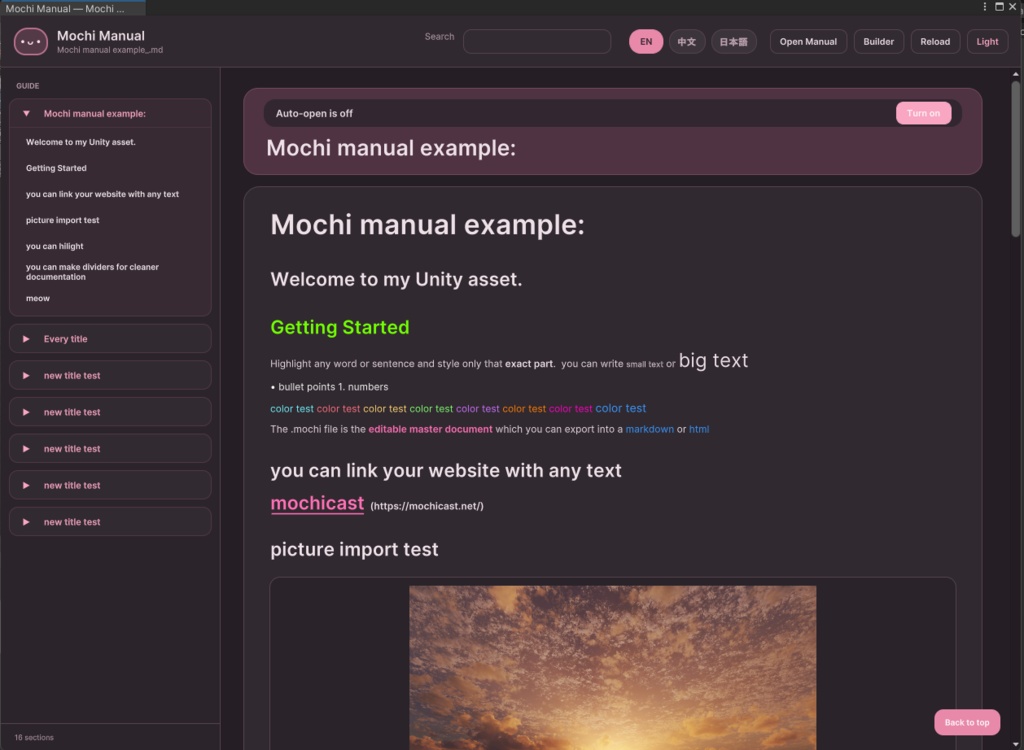
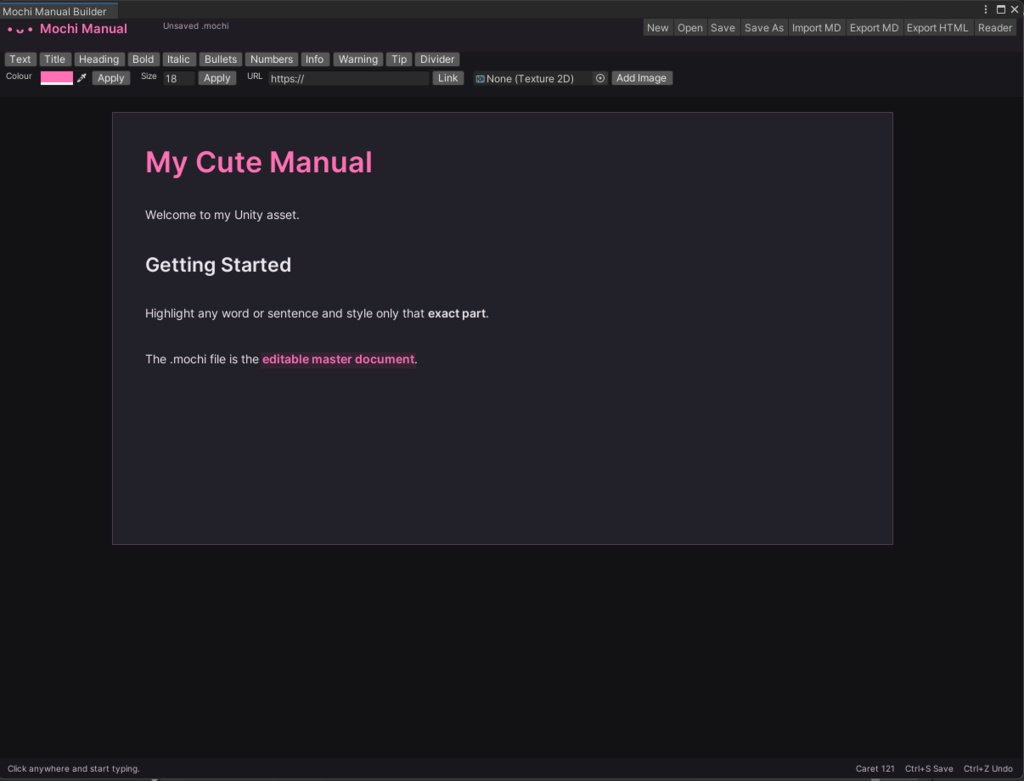
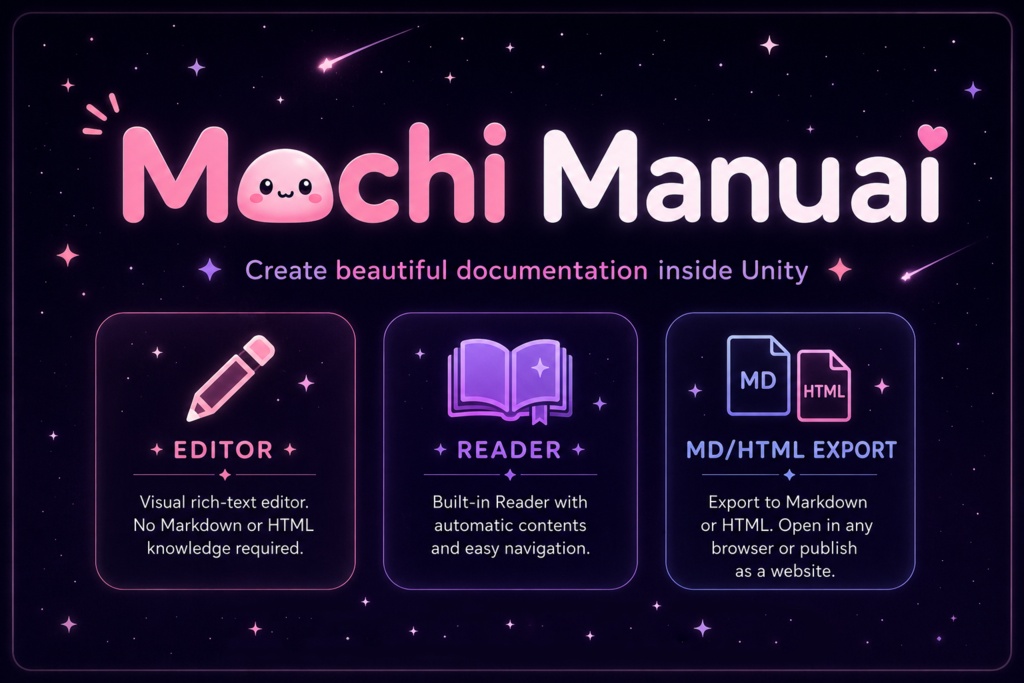
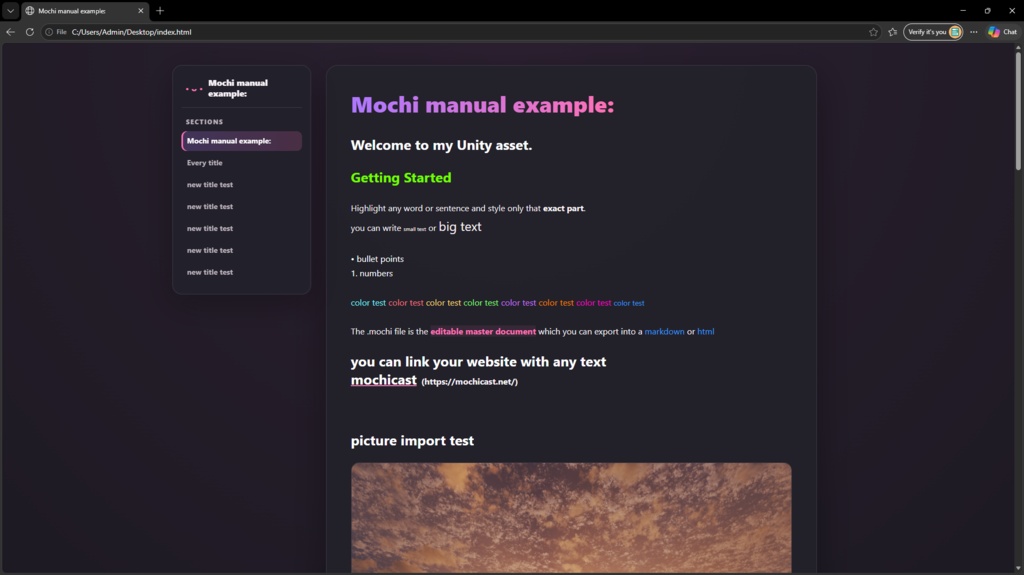
Create documentation for your assets directly inside Unity without writing Markdown or HTML. Unity - tools - world creator kit - mochi manual Mochi Manual gives you a simple visual editor where you can highlight text and instantly turn it into titles, headings, links, coloured text, callouts, lists and more. What you see while editing closely matches the final document. Save your work as an editable .mochi file, export it as Markdown, or generate a styled HTML page that can be opened in any browser or uploaded as a real website. The included Reader can open both .mochi and .md files inside Unity. It automatically creates a contents sidebar from your titles and headings, making long documentation easy to navigate. Features Visual rich-text editor inside Unity No Markdown or HTML knowledge required Editable .mochi document format Import and export Markdown Export beautiful standalone HTML documentation Upload HTML exports as real websites Built-in Markdown and .mochi Reader Automatic contents sidebar Images Titles and headings Bold, italic, colours and custom font sizes Bullet and numbered lists Info, warning and tip highlights Dividers Easier than PowerPoint Perfect for asset creators and anyone who wants documentation that looks better than a plain README. MarkdownやHTMLを書くことなく、Unity内でアセット用のドキュメントを作成できます。 Unity - tools - world creator kit - mochi manual Mochi Manualは、テキストを選択してボタンを押すだけで、タイトル、見出し、リンク、文字色、コールアウト、リストなどを簡単に追加できるビジュアルエディターです。編集中の見た目が、そのまま完成したドキュメントに近い形で表示されます。 編集可能な.mochiファイルとして保存したり、Markdownとして書き出したり、ブラウザで開けるスタイル付きHTMLページを生成したりできます。生成したHTMLは、そのままウェブサイトとしてアップロードすることも可能です。 付属のReaderでは、Unity内で.mochiファイルと.mdファイルの両方を開くことができます。タイトルと見出しから目次サイドバーが自動生成されるため、長いドキュメントでも簡単に移動できます。 機能 Unity内で使えるビジュアルリッチテキストエディター MarkdownやHTMLの知識は不要 編集可能な.mochi形式 Markdownのインポートとエクスポート 美しいスタイル付きHTMLドキュメントを出力 HTMLをそのままウェブサイトとして公開可能 .mochiとMarkdownに対応したReader 自動生成される目次サイドバー 画像 タイトルと見出し 太字、斜体、文字色、カスタム文字サイズ 箇条書きと番号付きリスト 情報、警告、ヒントのハイライト 区切り線 PowerPointより簡単 アセット制作者や、普通のREADMEより美しいドキュメントを作りたい方に最適です。 无需编写 Markdown 或 HTML,即可直接在 Unity 中为你的资源创建文档。 Unity - tools - world creator kit - mochi manual Mochi Manual 提供一个简单的可视化编辑器。你只需要选中文字并点击按钮,就可以立即将其设置为标题、小标题、链接、彩色文字、提示框、列表等。编辑时看到的效果会非常接近最终生成的文档。 你可以将内容保存为可继续编辑的.mochi文件,导出为 Markdown,或者生成带有完整样式的 HTML 页面。HTML 文件可以在任何浏览器中打开,也可以直接上传并作为真正的网站使用。 内置 Reader 可以在 Unity 中打开.mochi和.md文件。它会根据标题和小标题自动生成左侧目录,让较长的文档也能轻松浏览。 功能 Unity 内置可视化富文本编辑器 无需了解 Markdown 或 HTML 可编辑的.mochi文档格式 导入和导出 Markdown 导出漂亮的独立 HTML 文档 HTML 文件可以直接作为网站上传 内置 Markdown 和.mochi Reader 自动生成目录侧边栏 图片 标题和小标题 粗体、斜体、文字颜色和自定义字号 项目符号列表和编号列表 信息、警告和提示高亮 分隔线 比 PowerPoint 更简单 非常适合资源制作者,以及任何希望文档比普通 README 更漂亮的人。
Documentation creator and Markdown reader for Unity
Create documentation for your assets directly inside Unity without writing Markdown or HTML. Unity - tools - world creator kit - mochi manual Mochi Manual gives you a simple visual editor where you can highlight text and instantly turn it into titles, headings, links, coloured text, callouts, lists and more. What you see while editing closely matches the final document. Save your work as an editable .mochi file, export it as Markdown, or generate a styled HTML page that can be opened in any browser or uploaded as a real website. The included Reader can open both .mochi and .md files inside Unity. It automatically creates a contents sidebar from your titles and headings, making long documentation easy to navigate. Features Visual rich-text editor inside Unity No Markdown or HTML knowledge required Editable .mochi document format Import and export Markdown Export beautiful standalone HTML documentation Upload HTML exports as real websites Built-in Markdown and .mochi Reader Automatic contents sidebar Images Titles and headings Bold, italic, colours and custom font sizes Bullet and numbered lists Info, warning and tip highlights Dividers Easier than PowerPoint Perfect for asset creators and anyone who wants documentation that looks better than a plain README. MarkdownやHTMLを書くことなく、Unity内でアセット用のドキュメントを作成できます。 Unity - tools - world creator kit - mochi manual Mochi Manualは、テキストを選択してボタンを押すだけで、タイトル、見出し、リンク、文字色、コールアウト、リストなどを簡単に追加できるビジュアルエディターです。編集中の見た目が、そのまま完成したドキュメントに近い形で表示されます。 編集可能な.mochiファイルとして保存したり、Markdownとして書き出したり、ブラウザで開けるスタイル付きHTMLページを生成したりできます。生成したHTMLは、そのままウェブサイトとしてアップロードすることも可能です。 付属のReaderでは、Unity内で.mochiファイルと.mdファイルの両方を開くことができます。タイトルと見出しから目次サイドバーが自動生成されるため、長いドキュメントでも簡単に移動できます。 機能 Unity内で使えるビジュアルリッチテキストエディター MarkdownやHTMLの知識は不要 編集可能な.mochi形式 Markdownのインポートとエクスポート 美しいスタイル付きHTMLドキュメントを出力 HTMLをそのままウェブサイトとして公開可能 .mochiとMarkdownに対応したReader 自動生成される目次サイドバー 画像 タイトルと見出し 太字、斜体、文字色、カスタム文字サイズ 箇条書きと番号付きリスト 情報、警告、ヒントのハイライト 区切り線 PowerPointより簡単 アセット制作者や、普通のREADMEより美しいドキュメントを作りたい方に最適です。 无需编写 Markdown 或 HTML,即可直接在 Unity 中为你的资源创建文档。 Unity - tools - world creator kit - mochi manual Mochi Manual 提供一个简单的可视化编辑器。你只需要选中文字并点击按钮,就可以立即将其设置为标题、小标题、链接、彩色文字、提示框、列表等。编辑时看到的效果会非常接近最终生成的文档。 你可以将内容保存为可继续编辑的.mochi文件,导出为 Markdown,或者生成带有完整样式的 HTML 页面。HTML 文件可以在任何浏览器中打开,也可以直接上传并作为真正的网站使用。 内置 Reader 可以在 Unity 中打开.mochi和.md文件。它会根据标题和小标题自动生成左侧目录,让较长的文档也能轻松浏览。 功能 Unity 内置可视化富文本编辑器 无需了解 Markdown 或 HTML 可编辑的.mochi文档格式 导入和导出 Markdown 导出漂亮的独立 HTML 文档 HTML 文件可以直接作为网站上传 内置 Markdown 和.mochi Reader 自动生成目录侧边栏 图片 标题和小标题 粗体、斜体、文字颜色和自定义字号 项目符号列表和编号列表 信息、警告和提示高亮 分隔线 比 PowerPoint 更简单 非常适合资源制作者,以及任何希望文档比普通 README 更漂亮的人。